The product
The whole agency, from one record of each visit.
The office, the caregivers, the families and the bookkeeper each have their own way in to the same visits. This page shows what each of them sees, and says plainly what is built and what is not.
 Demo data
V-2217one visit record · 5 lines · typed once
Every screen on this page reads this one record.
A visit is written once, by the office. Everything after that is somebody adding to the same record, not copying it.
- Scheduled by
- the office · Mon 5:42 PM
- Clocked in at
- 6:50 AM · at the home
- Approved by
- the rules you set
- Billed at
- 2.0 h × $32.00 = $64.00
- Paid to caregiver
- 2.0 h regular · 9.3 mi
- Scheduled byPlanned once, as a repeating Tuesday visit. The schedule checked who was eligible and warned about overtime.
- Clocked in atOn the caregiver’s phone, into this same visit. The phone recorded the time and the place.
- Approved byEvery check passed, so nobody had to look. The reasons are on record.
- Billed atA line on the client’s invoice, built from the approved time.
- Paid to caregiverA row on the payroll review sheet, from the same minutes.
02For the office
Start the day knowing what needs a call.
Owners, office managers and schedulers work from the same board. It is built to show the decisions first and leave the routine alone.
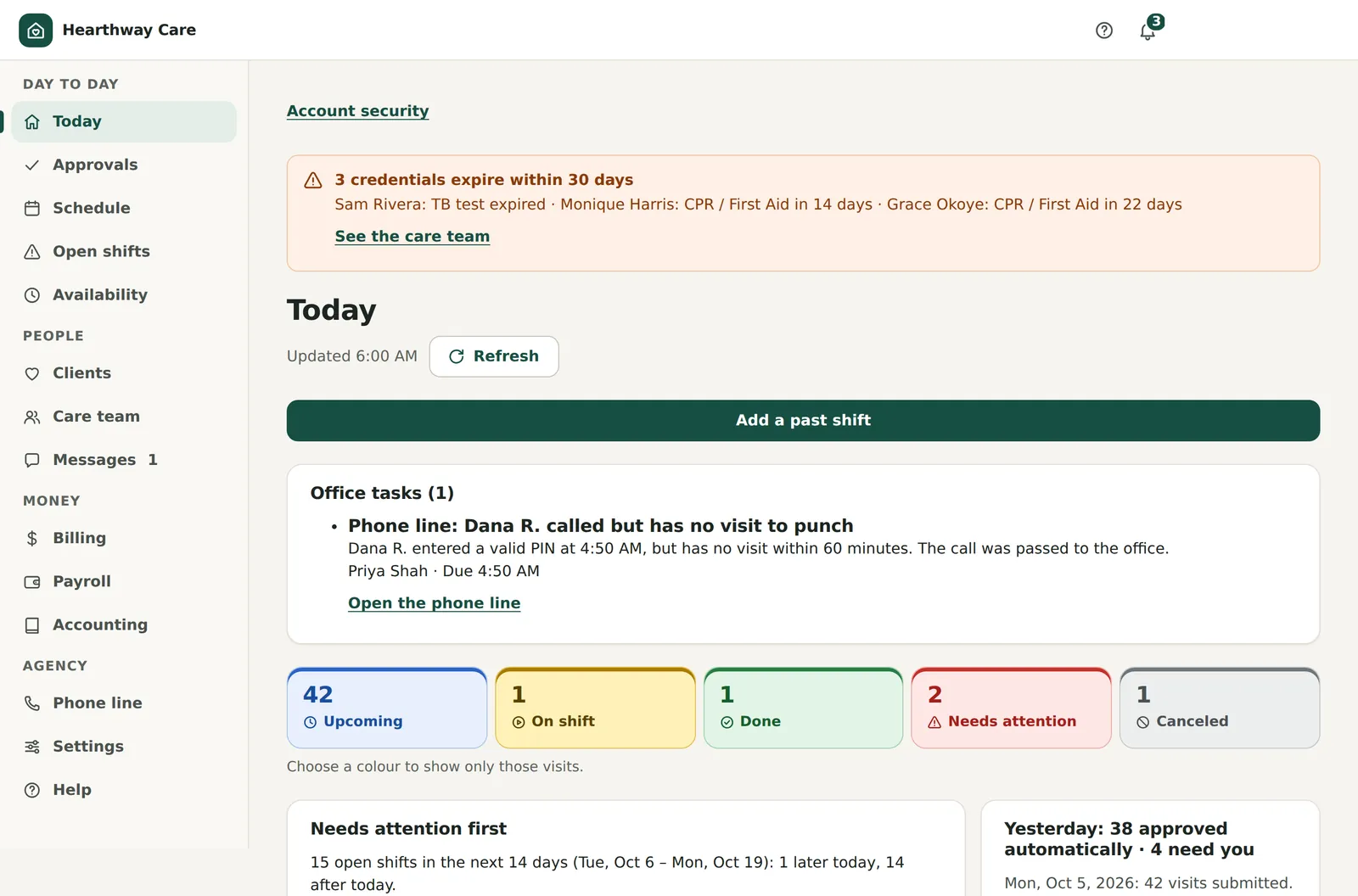
Every visit today, in five colours.
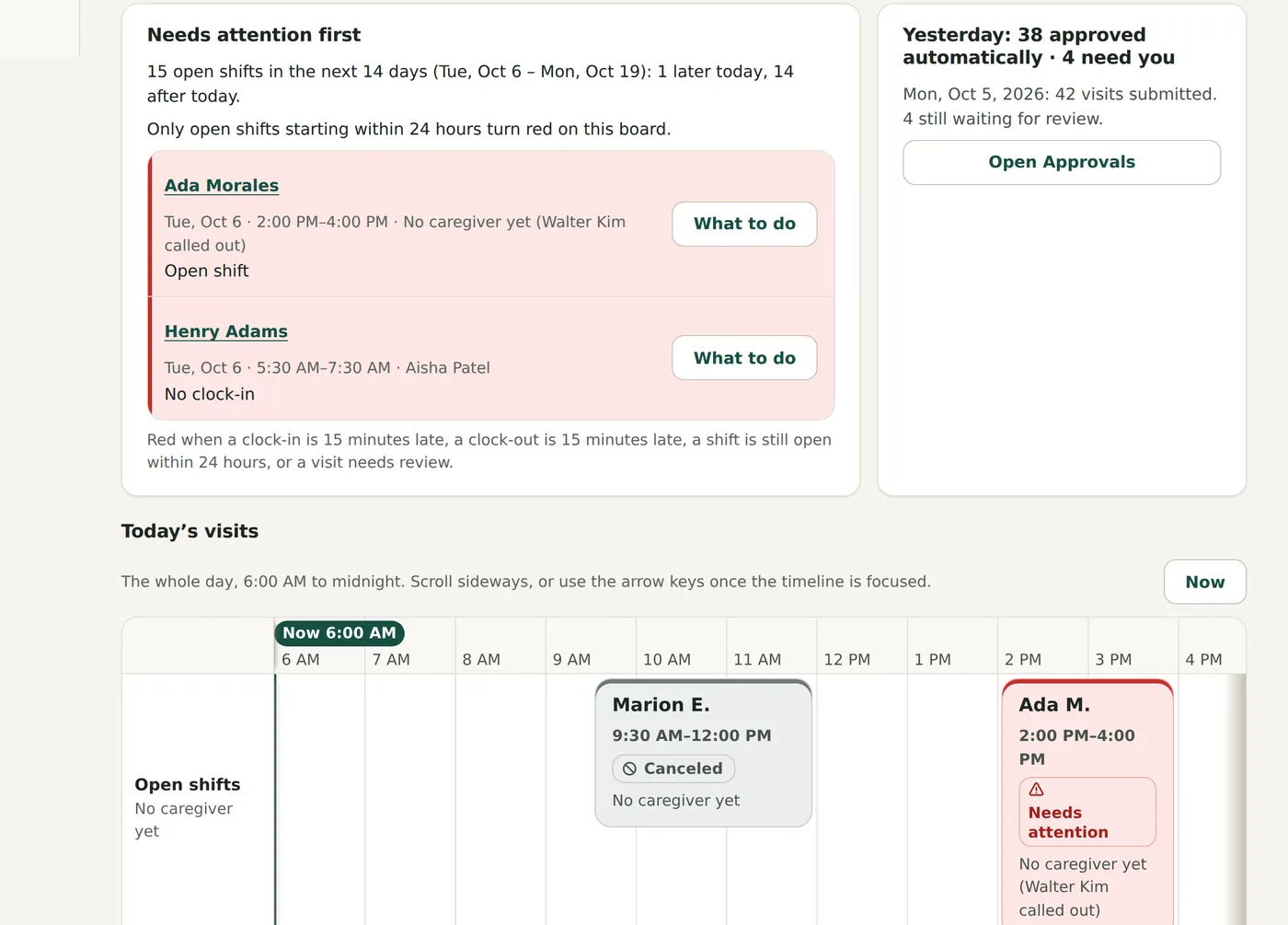
The board opens on what needs you: an open shift later today, a clock-in that is fifteen minutes late. Below it, a timeline shows each caregiver’s day from 6 AM to midnight.
- Upcoming, on shift, done, needs attention and canceled, counted at the top
- Each red tile says why it is red, with “What to do” and “Find cover”
- Banners for credentials about to expire and phone-line tasks
 Demo data
A call-out becomes a process, not a scramble.
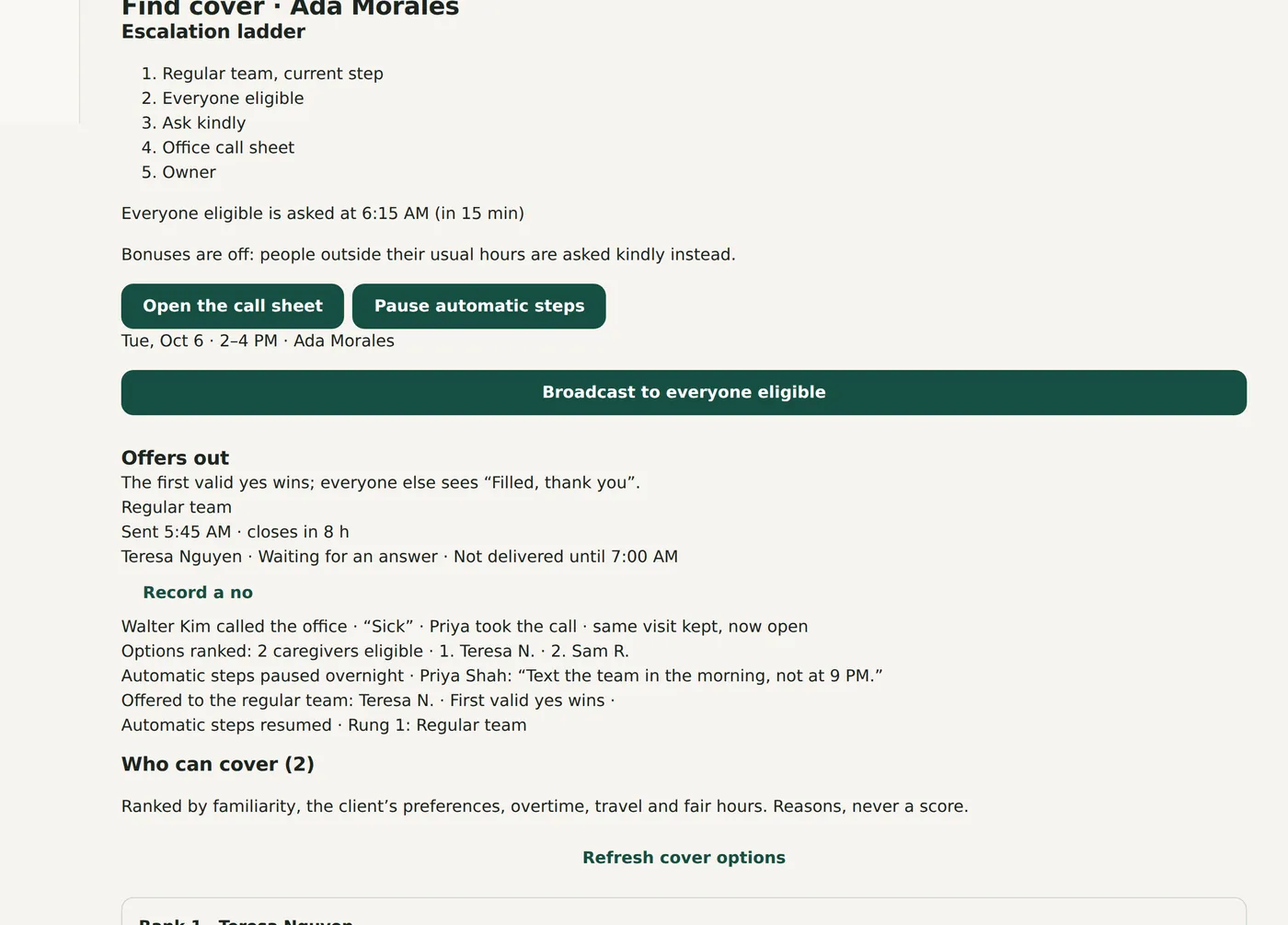
Record the call-out, or let the caregiver tap “I can’t make it”. The shift opens and offers go out in order: the client’s regular team first, then everyone eligible, then a call sheet. The first valid yes is confirmed unless it would cause overtime or break continuity. Bonuses are the last step and are off unless you turn them on.
Offer alerts to caregivers’ phones need push or email, which is connected during installation.
- Who can cover, ranked by familiarity, the client’s preferences, overtime, travel and fair hours
- Reasons are shown for every ranking. There is never a score
- For clients marked “ask first”, the family is asked before an unfamiliar caregiver is confirmed
 Demo data
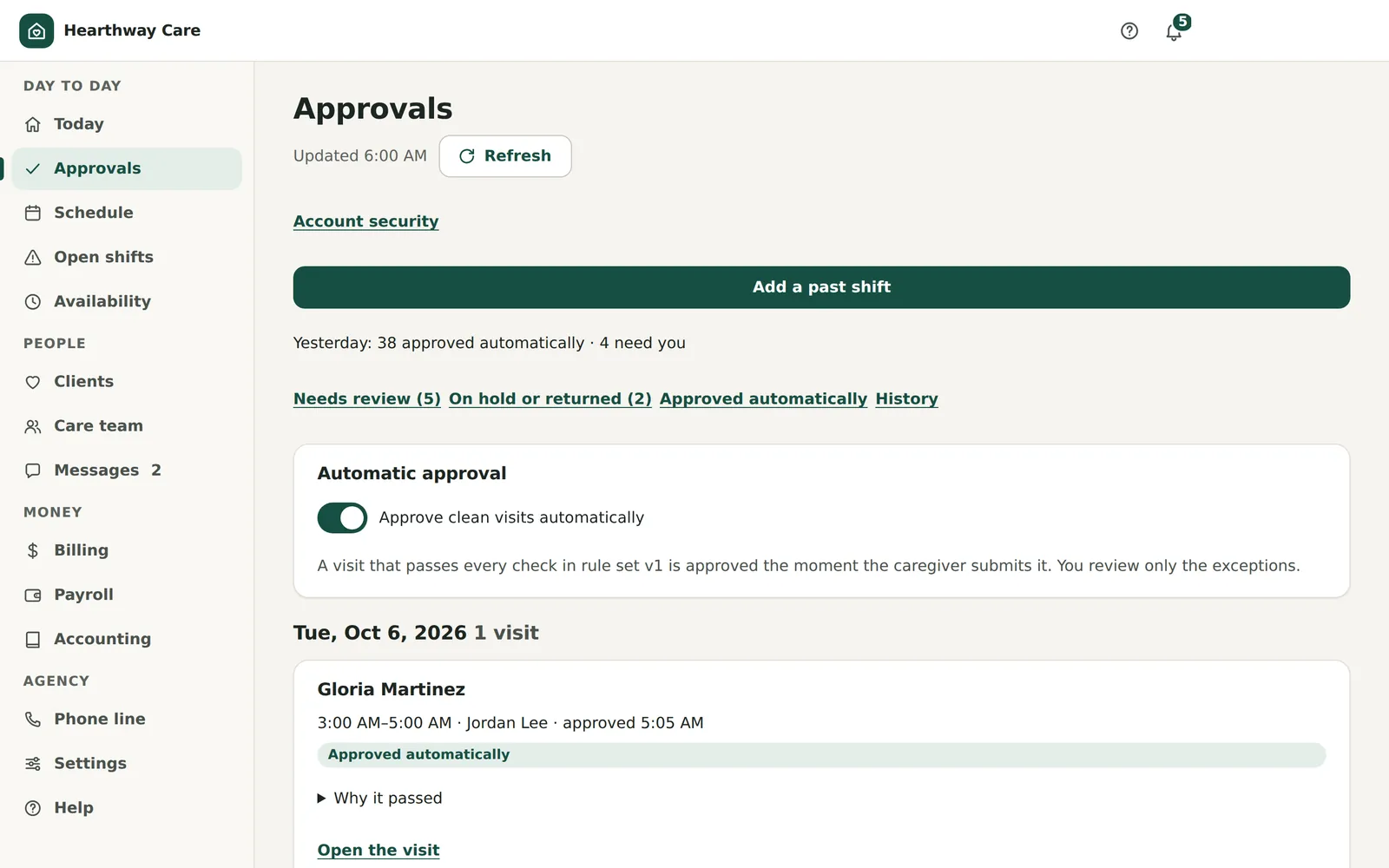
You review the exceptions. The rest approve themselves.
An exception is something a person should look at: a late or missing punch, a skipped task, a receipt, mileage over 15 miles, overtime, a thin note, a clock-in away from the home. You can pause automatic approval at any time.
- A clean visit is approved the moment it is submitted, with the reasons recorded
- Exceptions arrive with an owner and a due time
- Approve, adjust the time, return it to the caregiver, hold it, or mark it not billable
 Demo data
Also built for the office
- Weekly schedule with one-time and recurring visits, a caregiver per weekday, and delivered visits locked from edits
- Availability and time-off requests, with a heatmap of thin periods
- Seven credential types with an alert 30 days before expiry (dates are recorded; documents are not verified)
- Versioned care plans that a caregiver must read and confirm before clocking in
- A four-step intake for new clients, then a checklist for billing, schedule and family
- A notification centre where urgent items pass to the next person on call after 10 minutes
- An audit trail of who changed what, for the owner
- Help on every screen, 25 step-by-step guides and a glossary
- Every default rule listed in one place, so the owner can confirm or change it
03For caregivers
One screen says where to be.
Four tabs: Today, Shifts, Messages and Me. It installs from the phone’s browser, so there is nothing to find in an app store.
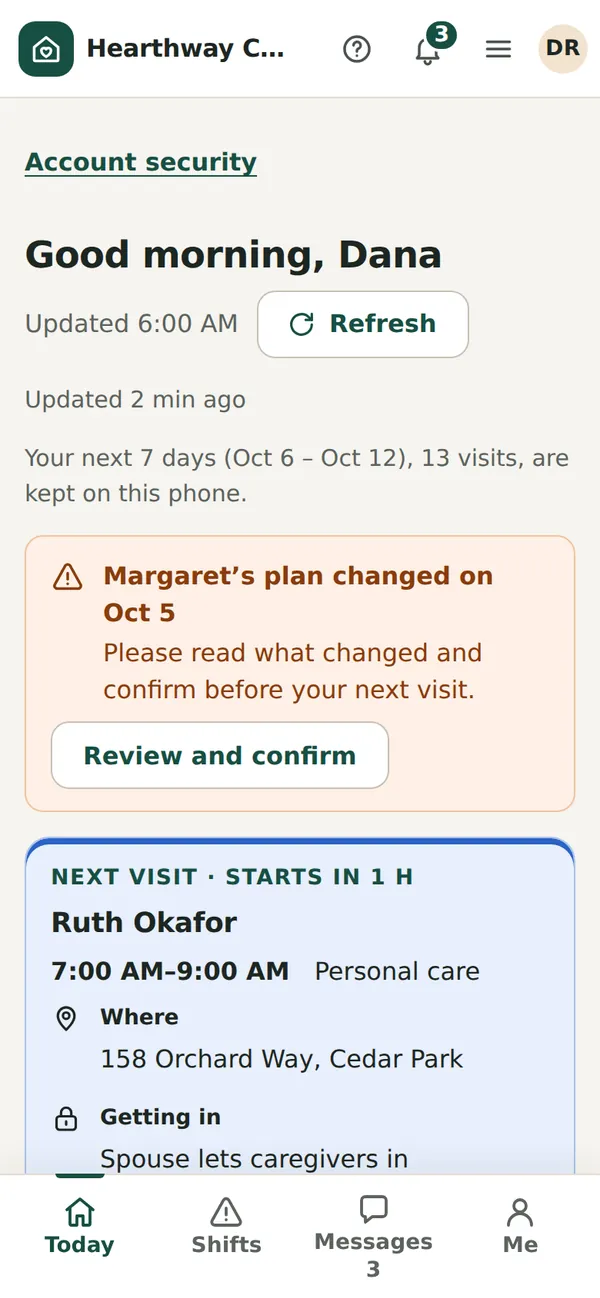
The next visit, how to get in, and what changed.
The app is built to keep working in basements and dead zones. Clock-ins and saved notes wait on the phone and sync when the signal comes back.
- The address, how to get in and the safety notes, at every visit
- A changed care plan has to be read and confirmed before clock-in
- The next seven days are kept on the phone, encrypted
 Demo data
Proof of the visit, with a plain verdict.
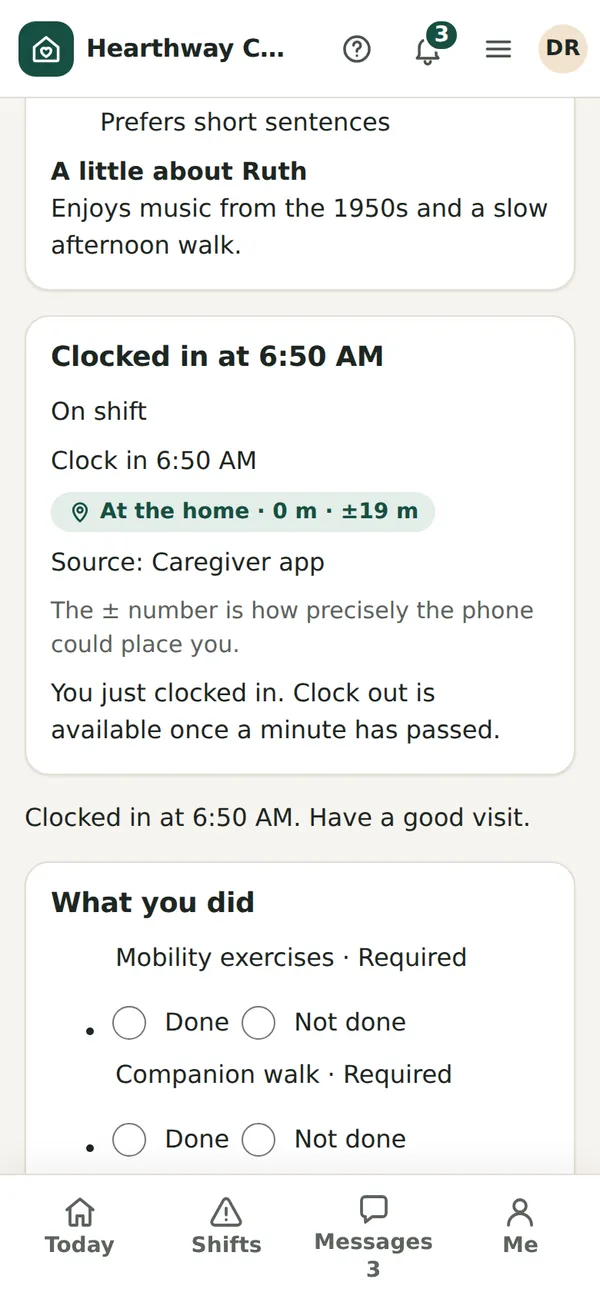
Clocking in records the time and where the phone is. “Away” asks the office to take a look; it does not lock the caregiver out. A private note to the office and a “Something worried me” flag sit beside the tasks.
- At the home, away, can’t tell, or not recorded, with the accuracy shown
- The home’s boundary is 150 metres by default and adjustable from 25 to 1,000
- Each task is marked done or not done, with a reason if not
- An on-screen signature where the payer needs one, such as the VA
 Demo data
Extra hours, offered to the right people.
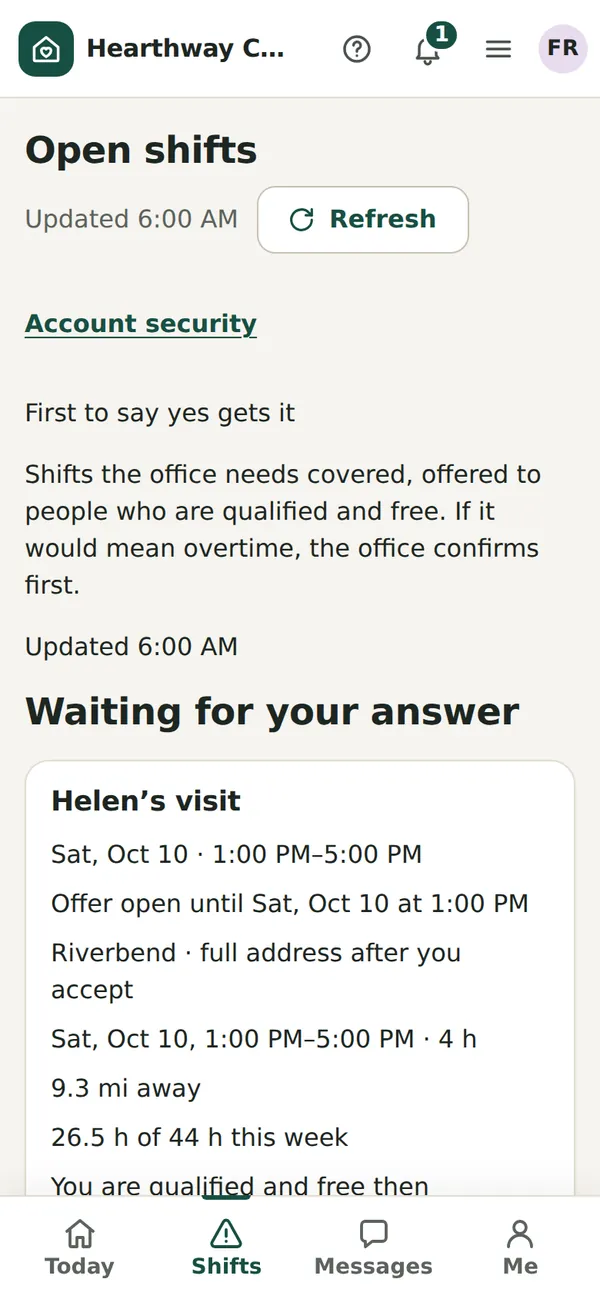
Shifts the office needs covered are offered to caregivers who are qualified and free. Each caregiver’s own limits count: maximum weekly hours, how far they will travel and whether they take overnights. The first valid yes gets it.
 Demo data
Fewer questions on payday.
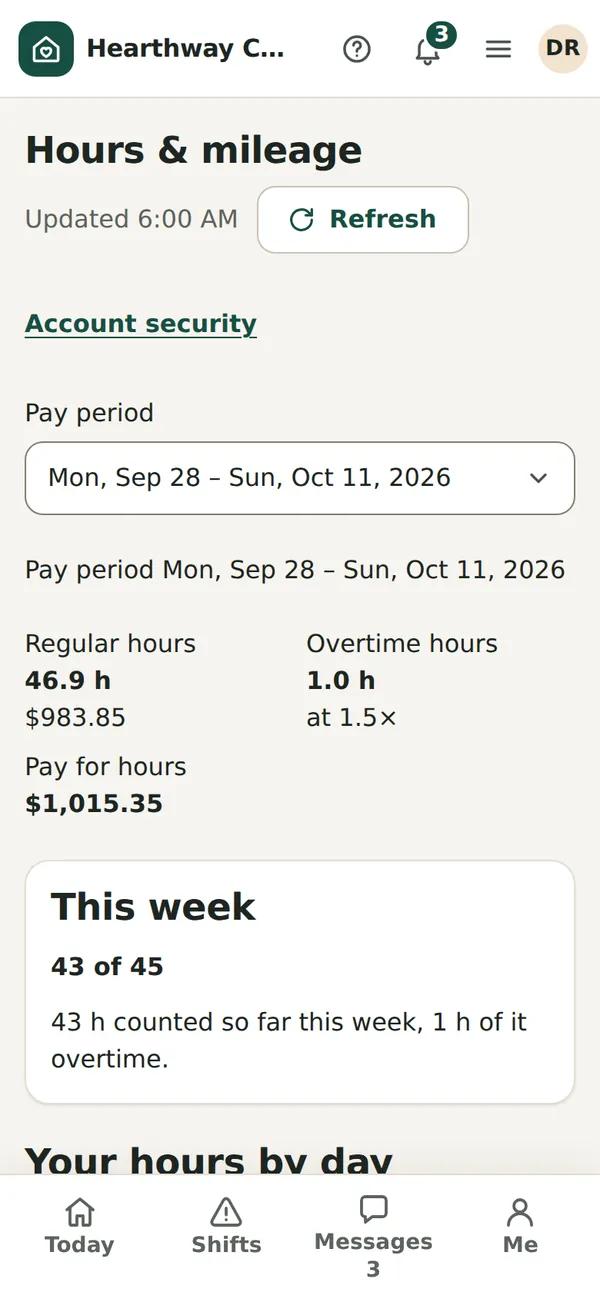
Caregivers see their own hours, overtime, mileage and reimbursements for each pay period. Errand trips are logged with miles and a purpose, and receipts are attached as a photo.
 Demo data
04For families
Families see what you choose, and only that.
A large-text page for clients and their families, so fewer of them need to call the office to ask what is happening.
The coordinator sees care. The payer sees the bill.
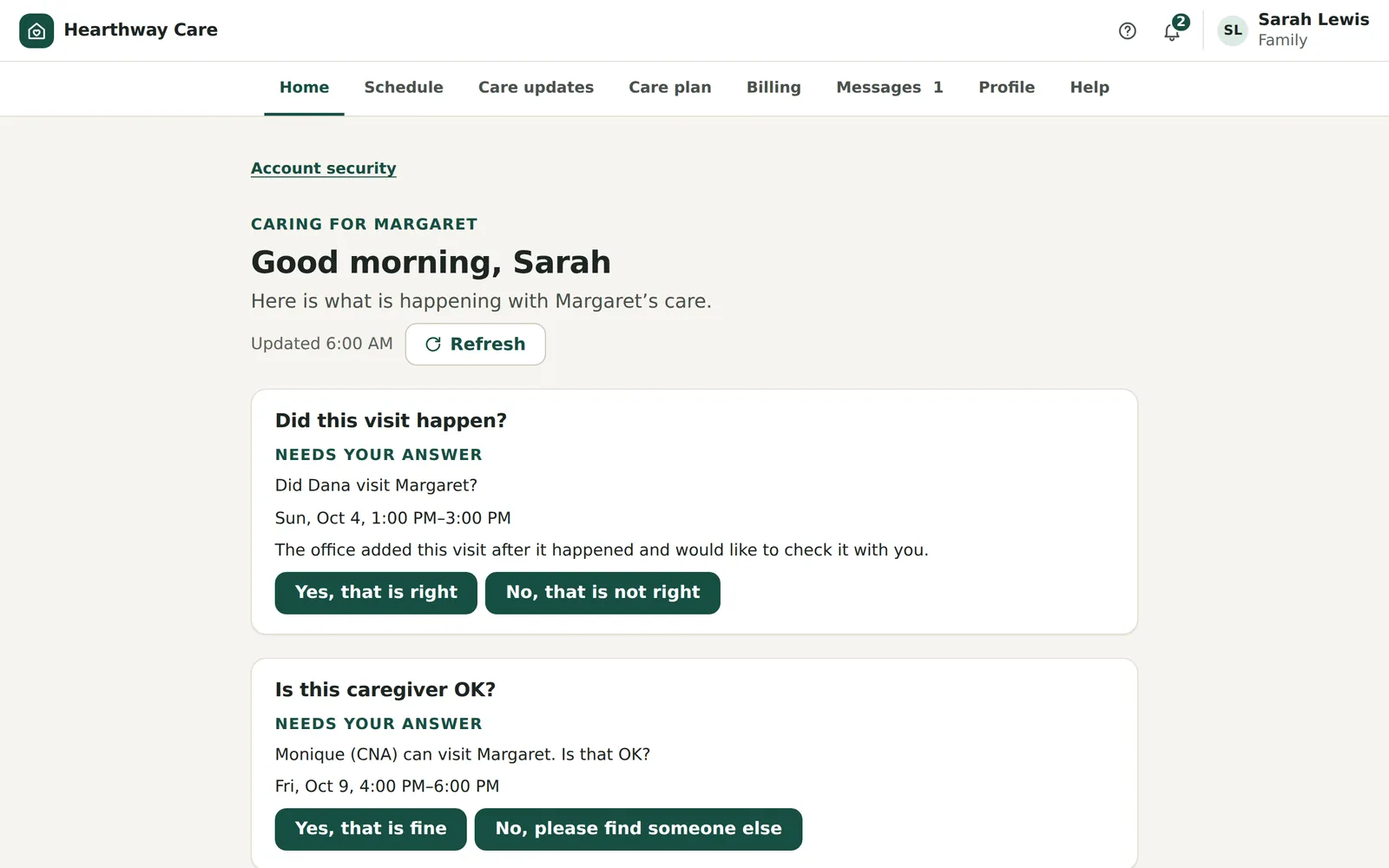
A daughter who coordinates care sees the schedule, care updates and the care plan. She can answer “Is this caregiver OK?” with one button. Families can ask for extra care or a change; the request goes to the office, and the office decides.
- Access presets for a care coordinator, notifications only, the bill-payer and a designated representative
- Invitations expire after 14 days, and access can be removed
- Consent is recorded for each person and each channel
 Demo data
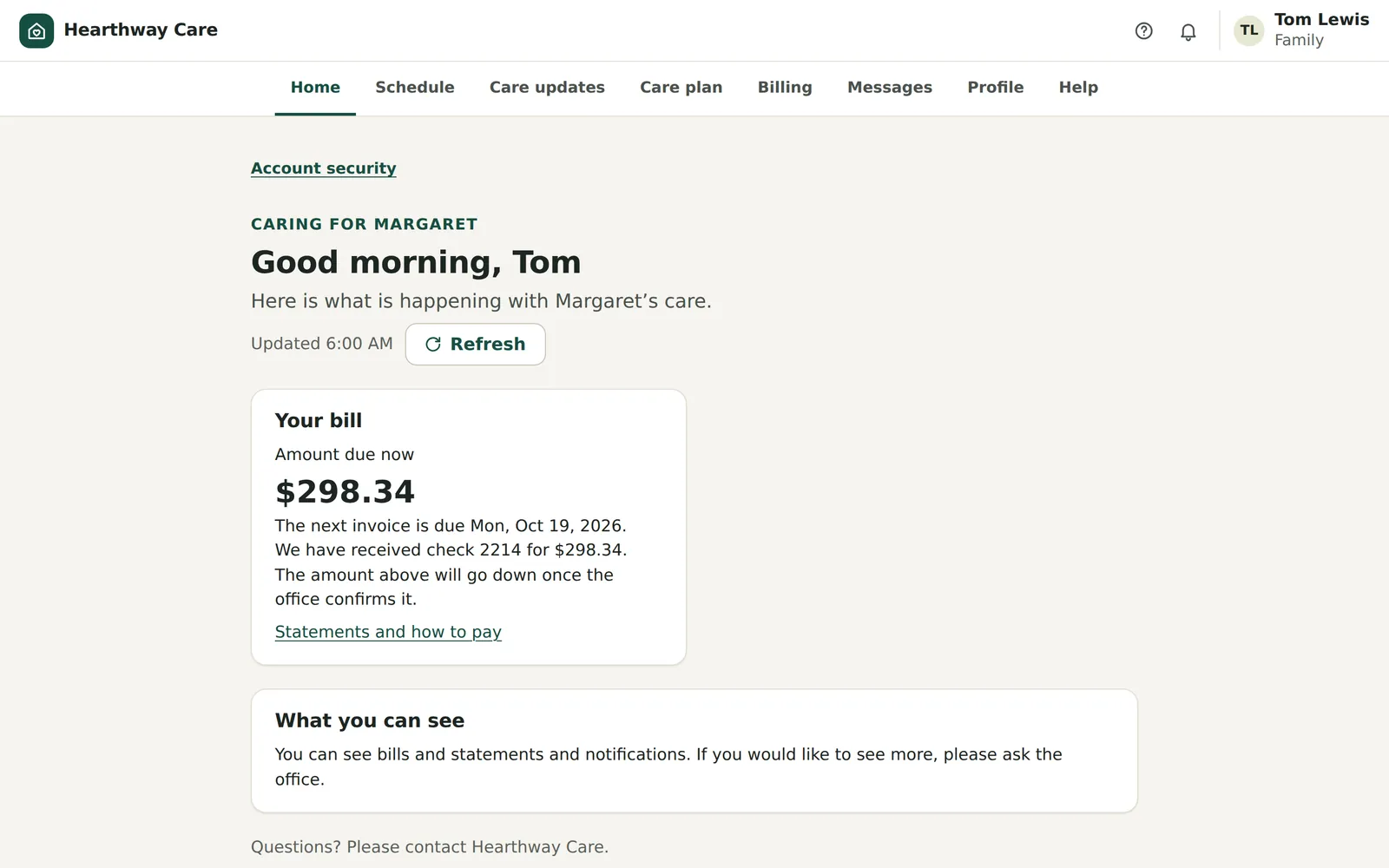
Her brother pays. He sees the bill and nothing else.
The amount due, the next invoice date and the statements. No care notes, no visit details. If he would like to see more, the page tells him to ask the office.
 Demo data
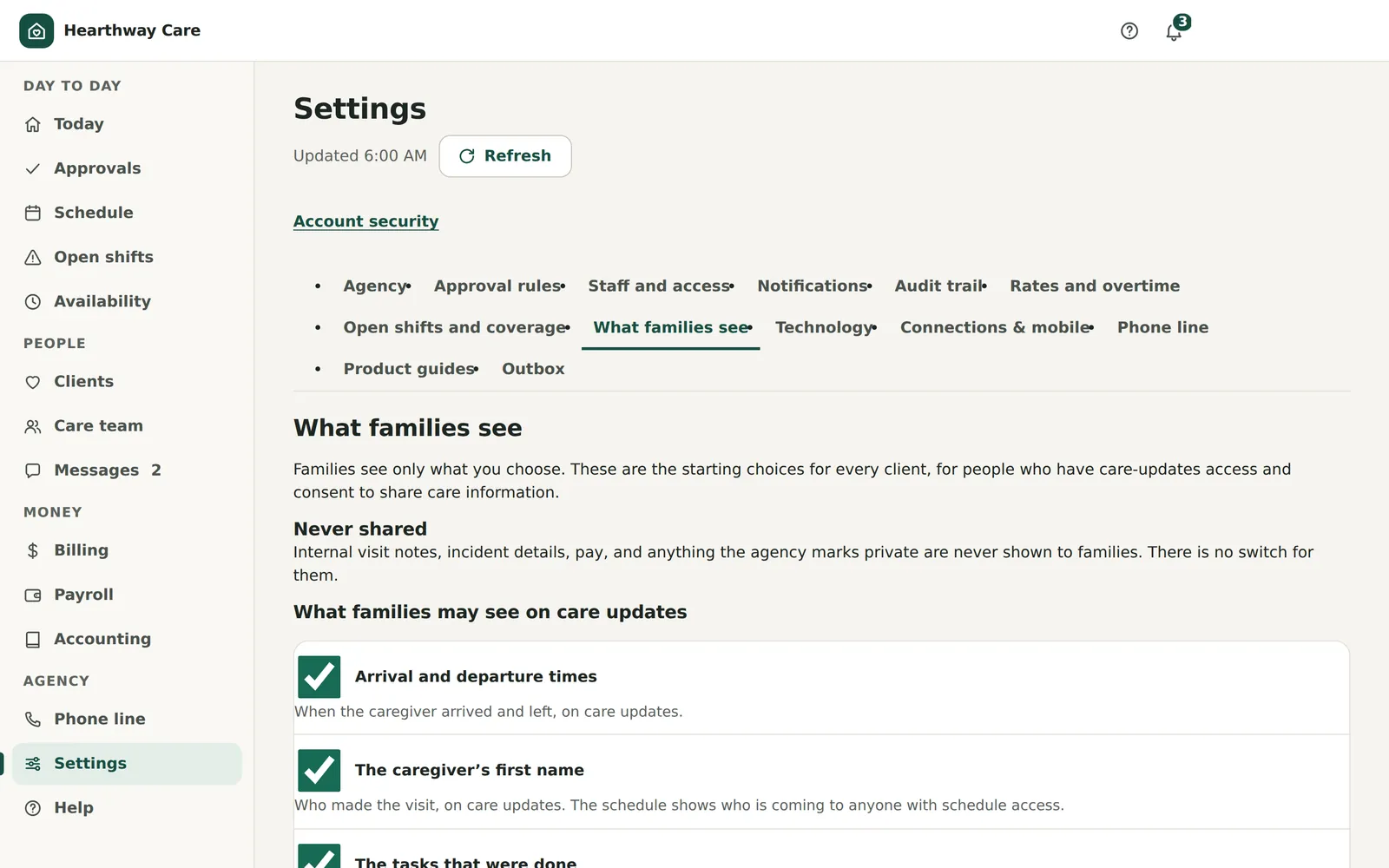
A privacy rule you can explain in one sentence.
Caregivers can write a line for the family at the end of a visit, and they see exactly what the family will see before they send it. Every care conversation includes the office; there are no private threads between a family and a caregiver.
- Agency-wide switches, with overrides for a single client
- Arrival and departure times, the caregiver’s first name, tasks done, the family note
- Internal notes, incidents and pay are never shared. There is no switch for them
 Demo data
05For billing and payroll
The books are built from the visits.
Planned, actual, billable and payable minutes are kept separately on the same visit. Invoices and the pay sheet both come from what was approved.
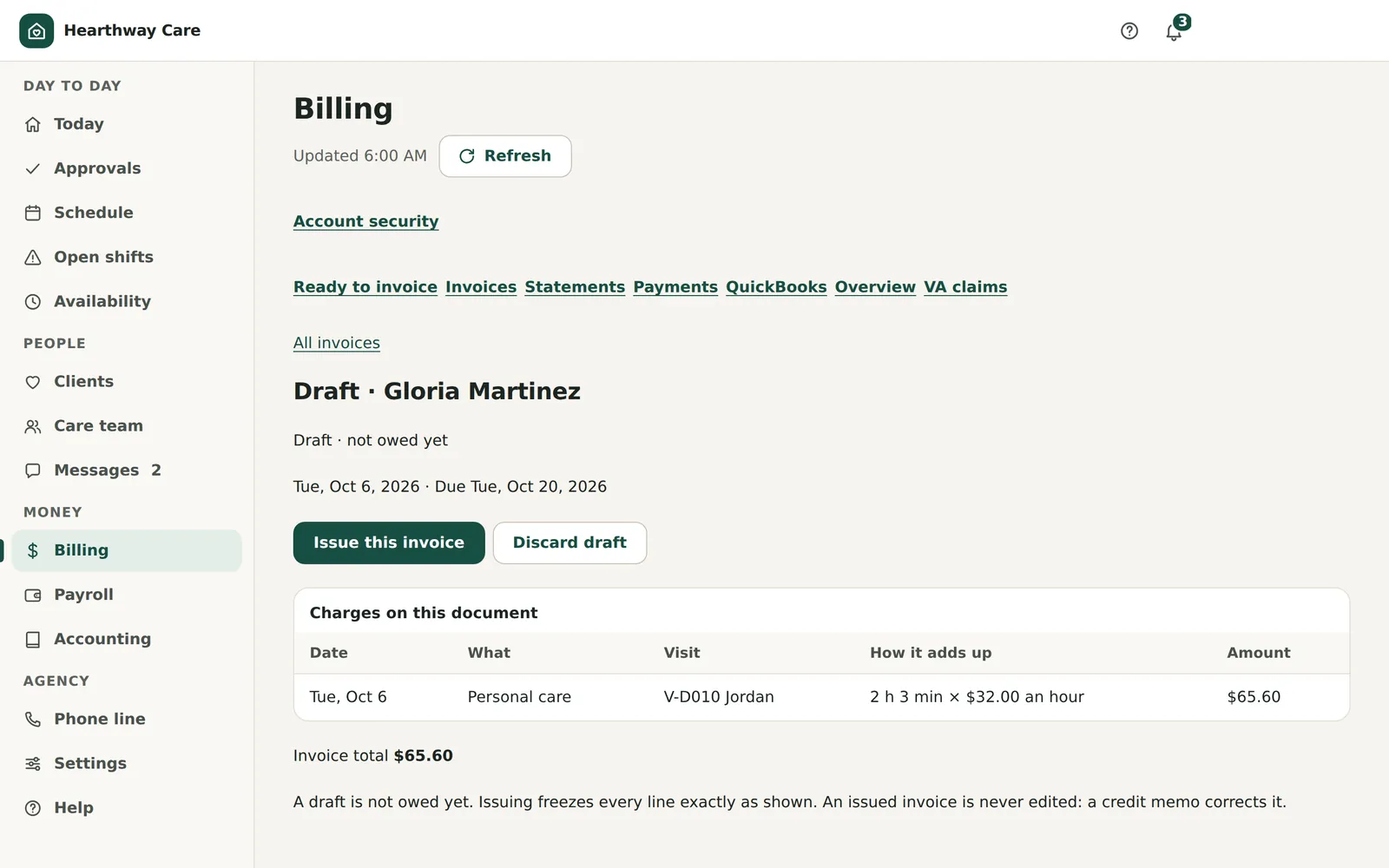
Approved visits become draft invoices.
Every line shows how it adds up: the time and the hourly rate. You choose whether a client is billed an overtime premium or the agency absorbs it. Payments by check are recorded as pending or confirmed, and past-due balances are tracked.
- Issuing an invoice freezes its number and its lines
- Corrections are made with a credit memo, never by editing
- Each client’s rate has a start date, so a rate change never rewrites an old invoice
 Demo data
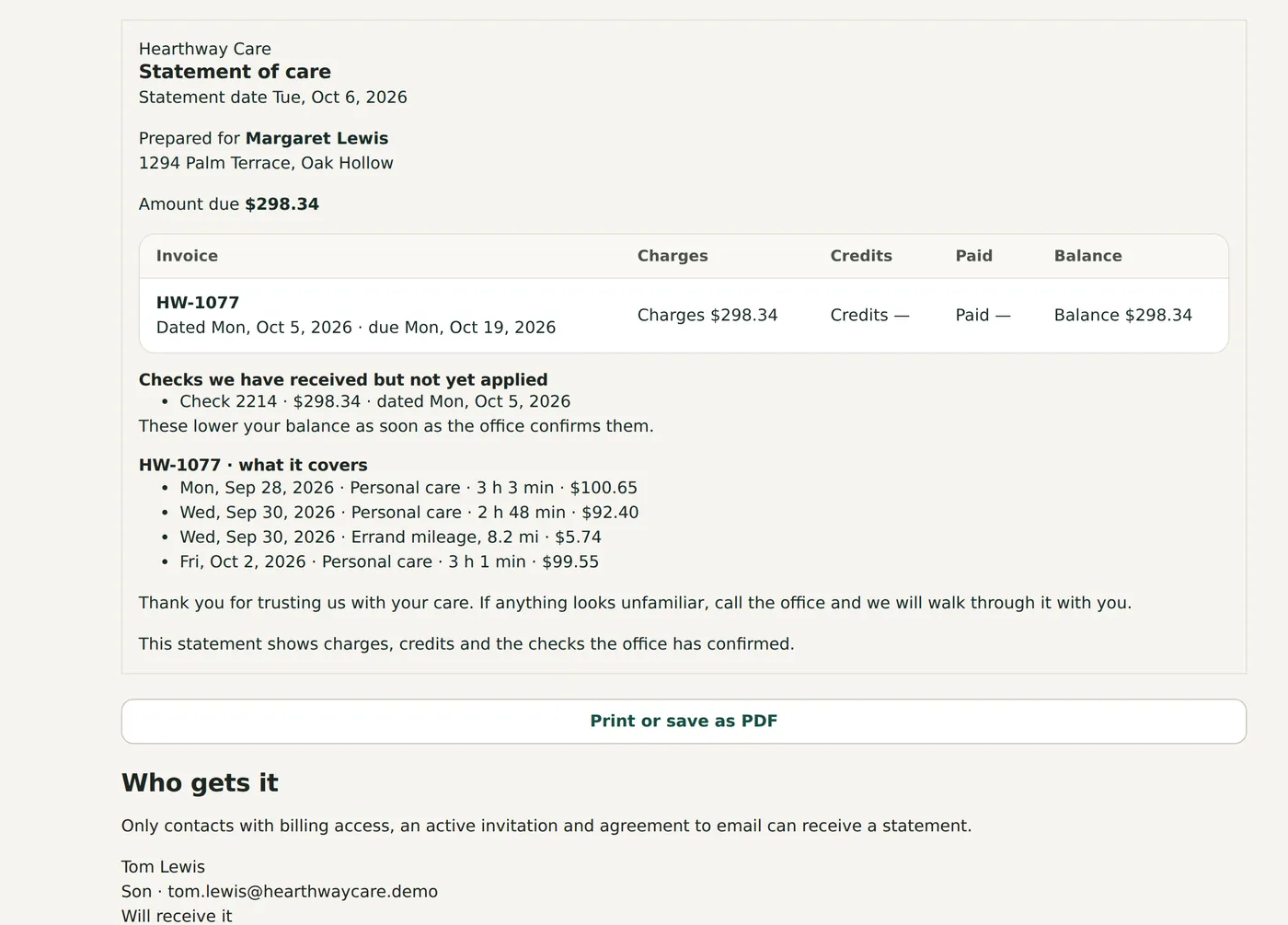
A statement a family can read.
Design the statement for each client, print it or save it as a PDF. Sending it publishes it to the family’s billing page with a notice in the app. Sending it by email needs the person’s consent and an email connection, which is made during installation.
 Demo data
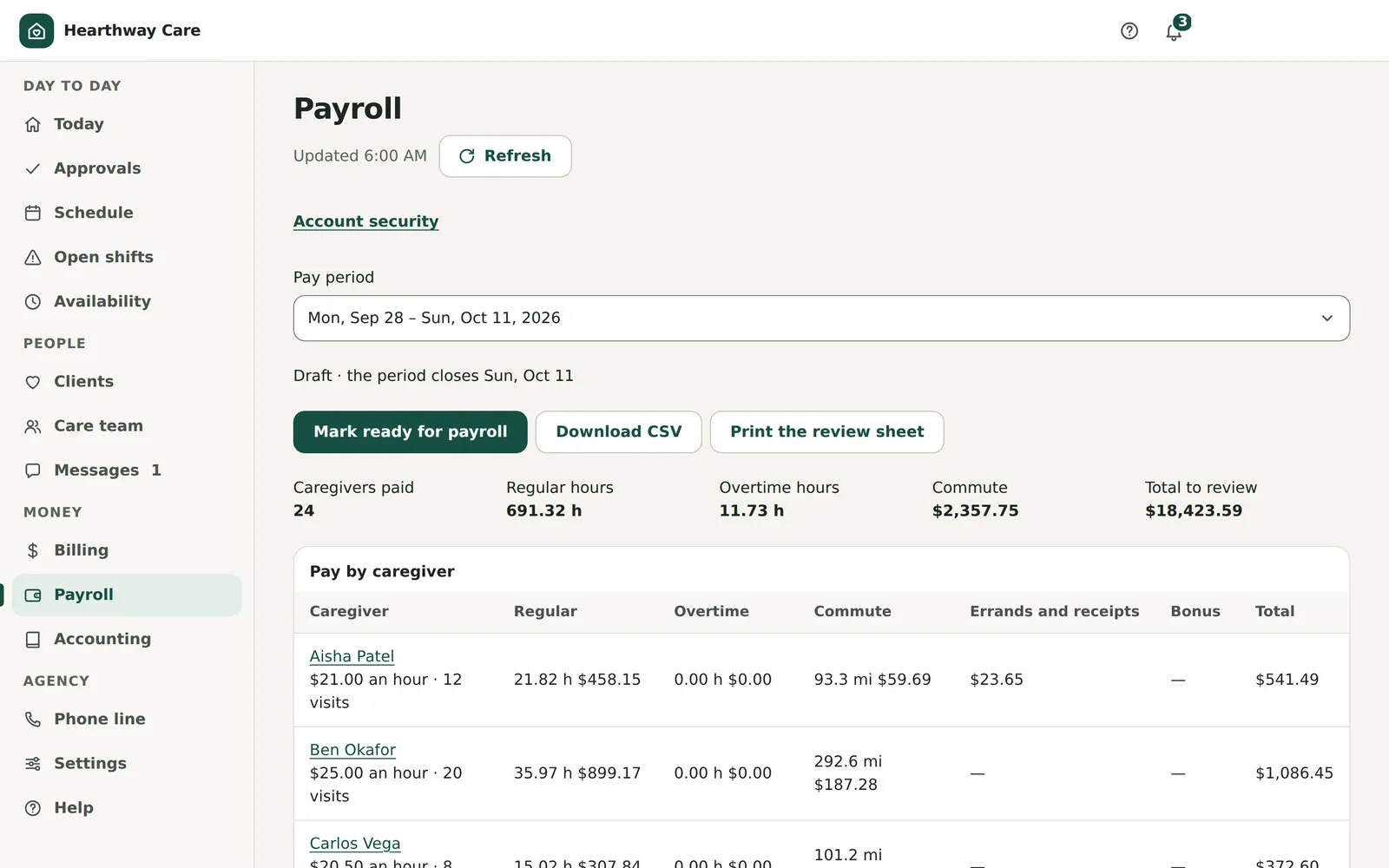
The pay run is prepared, not worked out by hand.
Pay periods are two weeks. The default overtime rule is over 9 hours in a day or 45 in a week, at one and a half times. It is a default: confirm it with whoever advises you on payroll.
- Regular hours, overtime, commute miles, errands, receipts and bonuses for each caregiver
- Mark the period ready, or reopen it
- Download a CSV or print the review sheet
 Demo data
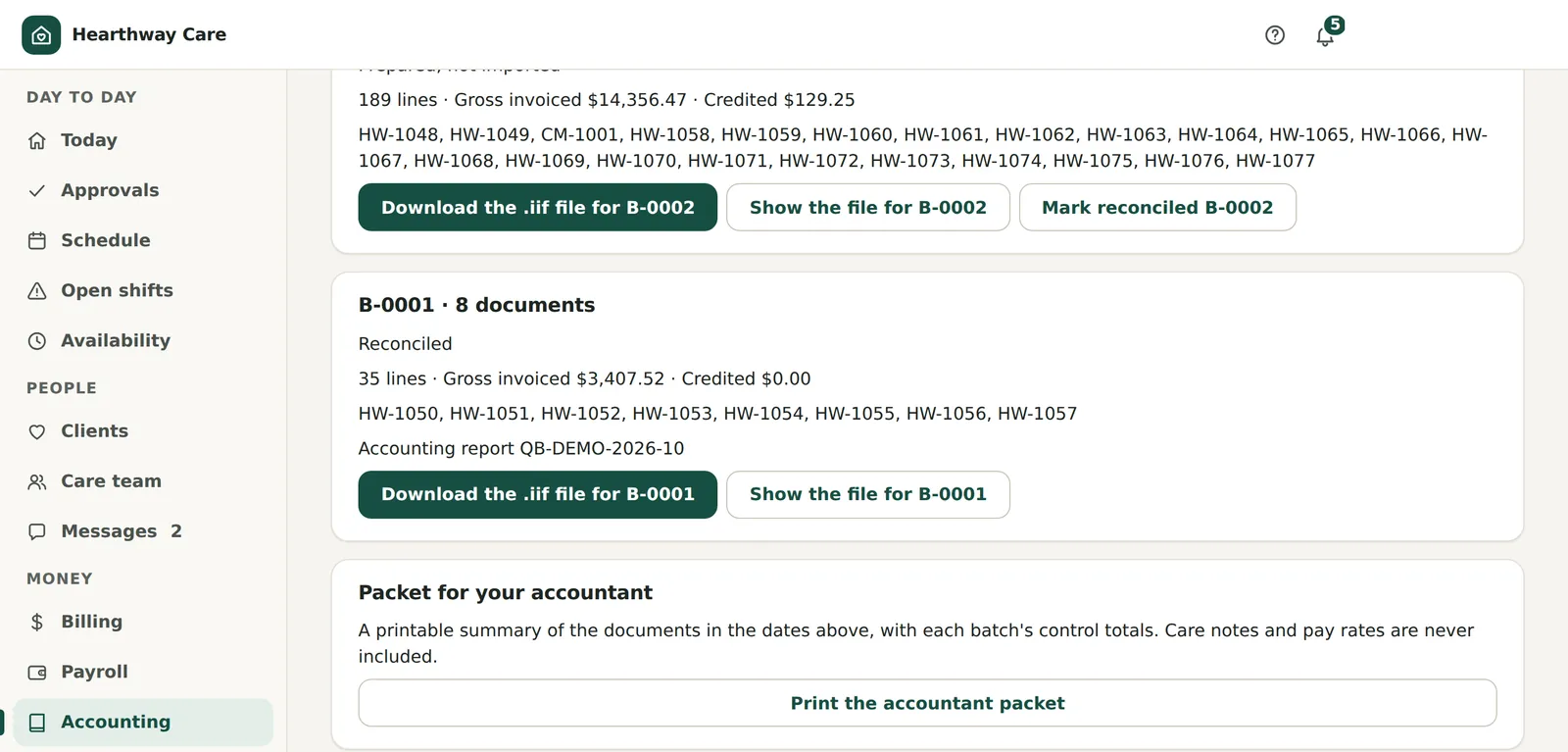
Your accountant keeps QuickBooks.
Pick the issued invoices and credit memos, map the income accounts and freeze a numbered batch. Download the file for QuickBooks Desktop, then mark the batch reconciled against its control totals. A printable packet for your accountant never includes care notes or pay rates.
 Demo data
?25 guides · 31 rules · 1 helper
Help comes built in, because there is no help desk.
Nobody answers a phone for this product. What your copy has instead is help on every screen, guides that point at the real controls, and an optional helper you can ask in plain words.
What is in the box.
- 25 step-by-step guides✓Included
13 for the office, 7 for caregivers, 5 for families. Each one points at the real control on the screen.
- A “?” on every screen✓Included
Help for the page you are on, a search box and a glossary of about 50 terms.
- A first-run checklist that ticks itself✓Included
It follows what has really been done in the app, not what somebody remembered to tick.
- The assumptions list✓Included
All 31 default rules, from overtime to approvals, each one yours to confirm or change.
- The AI helper◐Built. Turned on with your own key at setup.
A private chat for the owner and manager. Off until you connect your own Anthropic or OpenAI key.
Ask it anything about running Hearthway.
The helper is a private chat for the owner and the manager. It answers how-to questions. It is not a help desk: it does not fix bugs, apply updates or patch security. Pick a question to see the kind of answer it gives, and the two kinds it will not.
You ask: A caregiver just called out. What do I do?
Open Open shifts and choose Record a callout. Pick the caregiver and the visit. The visit stays the same visit and becomes open.
Then look at Who can cover. It ranks the people who are eligible, with the reasons, and asks the client’s regular team first. You have 15 open shifts in the next 14 days, so start with today’s.
Opens: Open shifts · the guide “Cover an open shift”
Questions go to the AI provider you chose. Don’t type client or caregiver details.
What it knows
- ✓Every screen, guide, rule and setting
- ✓Your agency’s counts and statuses, such as open shifts and visits waiting for approval
- ✓Your role, so it only describes what you can do
What it will not do
- ×See or change an individual client or caregiver record
- ×Fix bugs, apply updates or patch security
- ×Give legal, clinical, tax or payroll advice
How it runs
- ·Off by default. Only the owner can connect it.
- ·It runs on your own Anthropic or OpenAI key, and you pay that provider for what you use.
- ·You set the limits: questions per person and per agency each day, and a monthly cap.
- ·It removes identifying details before asking, on a best-effort basis. It can miss some.
- ·You accept a data notice first. Whether to sign a BAA with the AI provider is your decision.
- ·It can be wrong. It names the screen; you check the result.
Hear when it goes on sale.
One email, when it opens. From then the licence is $10,000, or $7,500 for the first 20 agencies or 90 days after general availability, whichever comes first.
Not on sale until general availability. The launch list costs nothing and commits you to nothing.